This blog post summarizes the book titled Statistical Inference via Data Science, written by Chester Ismay and Albert Kin

Preface

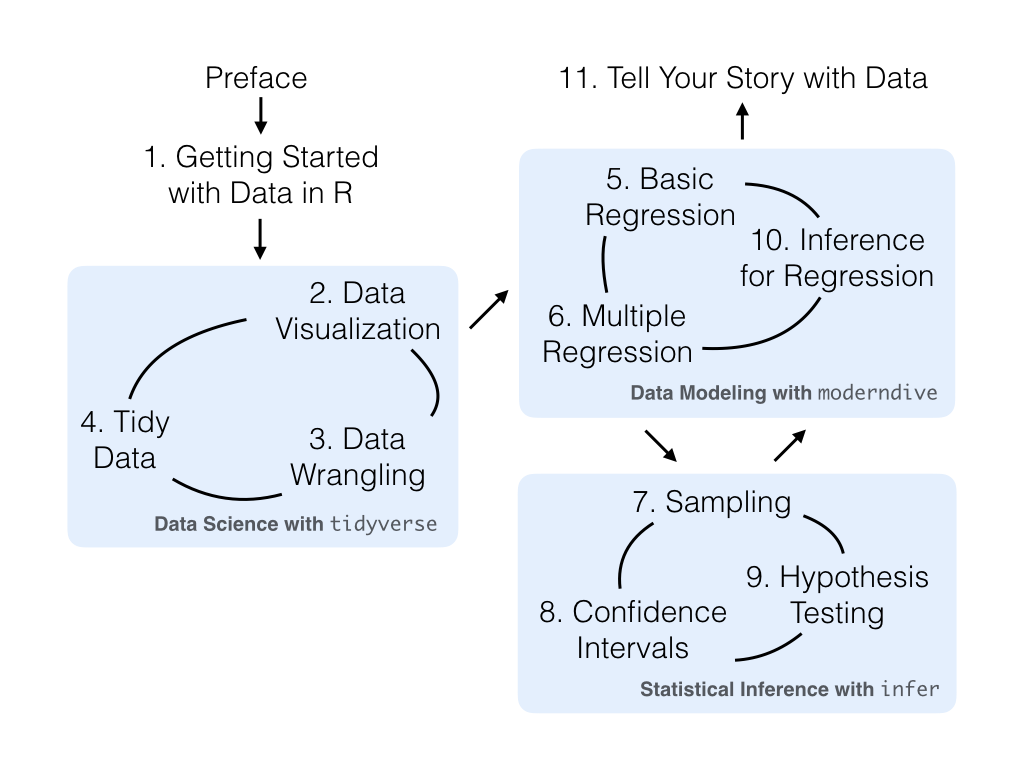
The authors offer a roadmap for the reader so that the various interconnections among the chapters are made clear, right away.

Getting Started with Data in R

The authors introduce R and RStudio so that a beginner can quickly get up to speed on the programming language and the IDE. A quick primer is provided for some of the packages that are used in the book.

Libraries used in the book

 1
 2
 3
 4
 5
 6
 7
 8
 9
10
11
12
13
14
15
16
library(tidyverse)
library(ggplot2movies)
library(nycflights13)
library(odbc)
library(writexl)
library(openxlsx)
library(gapminder)
library(readxl)
library(lubridate)
library(nycflights13)
library(knitr)
library(fivethirtyeight)
library(moderndive)
library(skimr)
library(broom)
library(janitor)

Data Visualization

The following are some of the main points covered in this chapter:

  • grammar of graphics defines a set of rules for constructing statistical graphics for combining different types of layers
  • A statistical graphic is a mapping of data variables to aesthetic attributes of geometric objects
  • A graphic can be divided in to three essential components
    • data: the dataset containing the variables of interest
    • geom: the geometric object in question. This refers to the type of object we can observe in a plot. For example: points, lines and bars
    • aes: aesthetics attributes of the geometric object. For example the data can be mapped to position. color, shape and size. Aesthetic attributes are mapped to variables in the dataset
  • 5 common graphs in data viz
    • scatterplots
    • linegraphs
    • boxplots
    • histograms
    • barplots
  • Joint distribution of variables can easily be visualized by mapping various elements of data to various aesthetic attributes

Sample R code

1
2
3
4
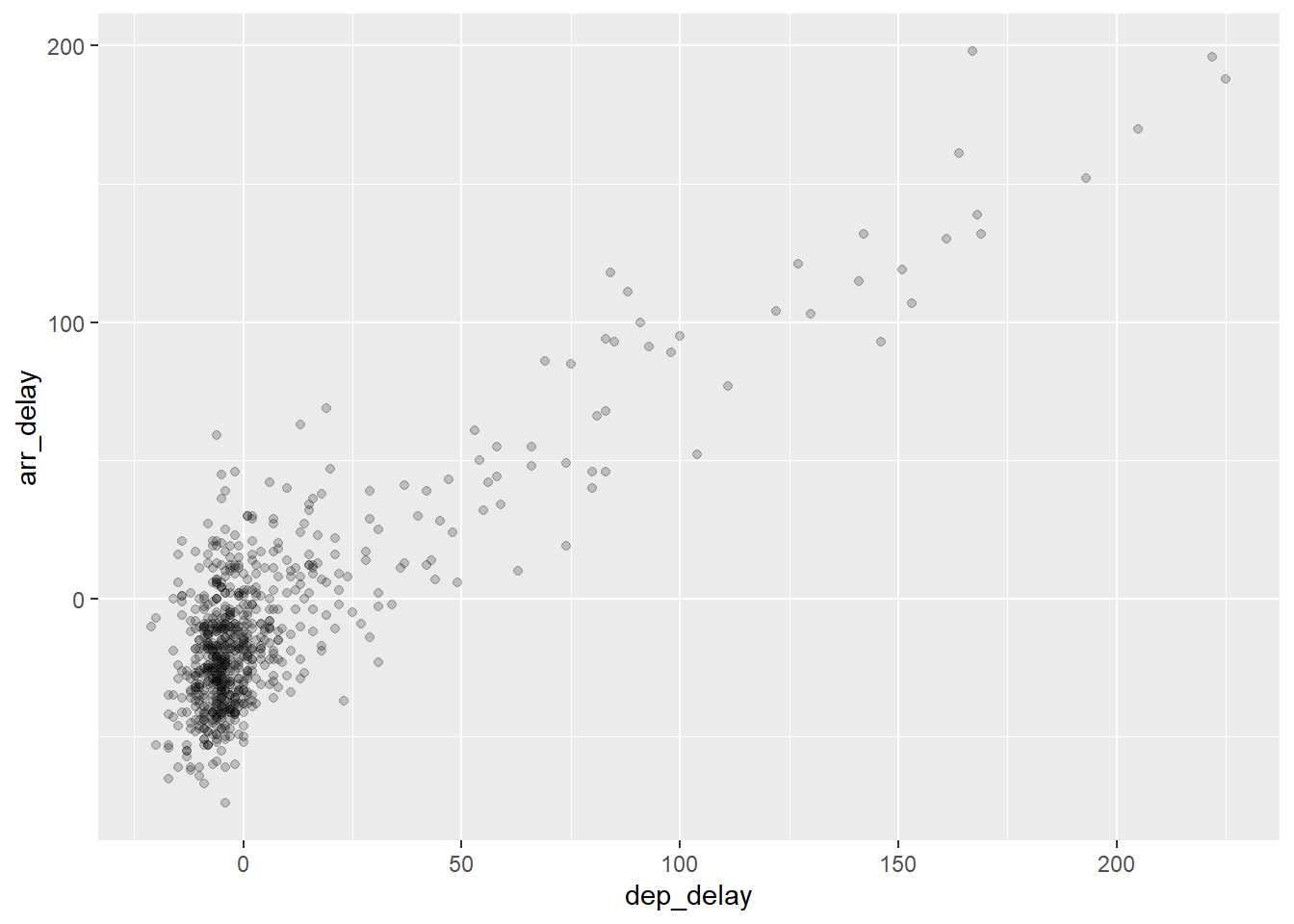
flights %>%
    filter(carrier=="AS") %>%
    ggplot(., mapping = aes( x = dep_delay, y = arr_delay)) +
    geom_point(alpha=0.2)
1
2
3
4
5

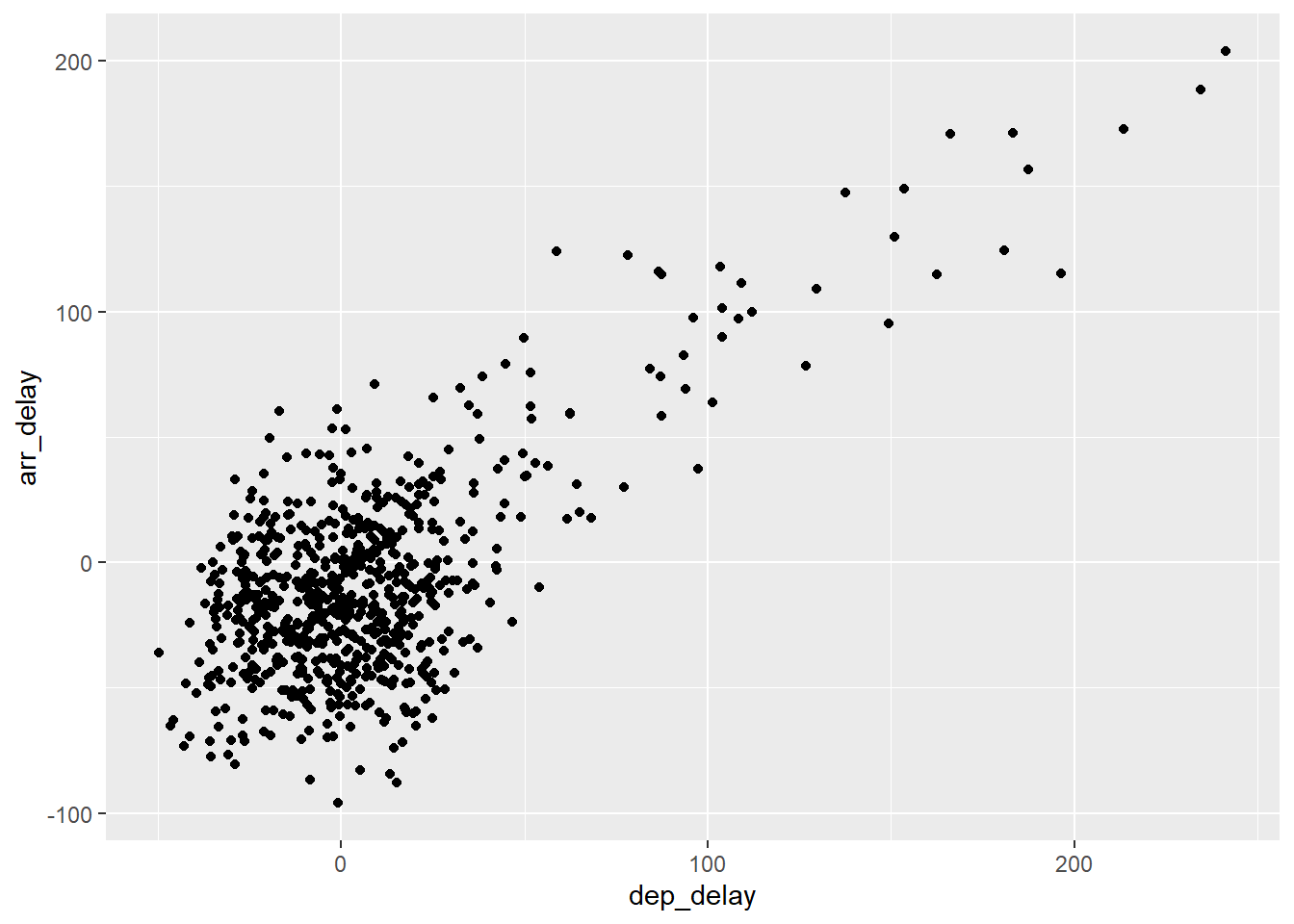
flights %>%
    filter(carrier=="AS") %>%
    ggplot(., mapping = aes( x = dep_delay, y = arr_delay)) +
    geom_jitter(width= 30, height =30)
1
2
3
4

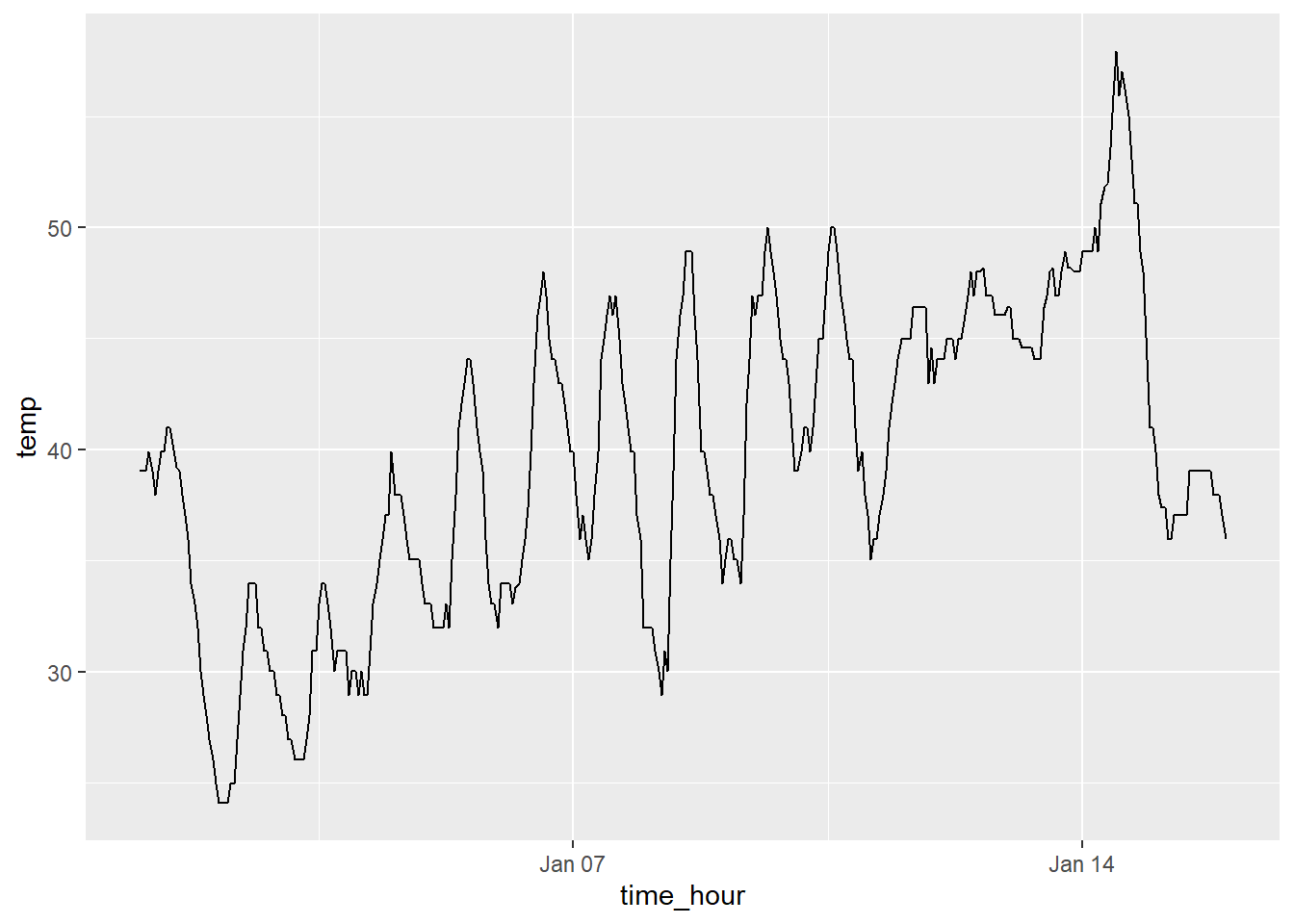
weather %>%
    filter(origin=='EWR' & month==1 & day <=15) %>%
    ggplot(., aes(x = time_hour, y = temp)) + geom_line()
1
2

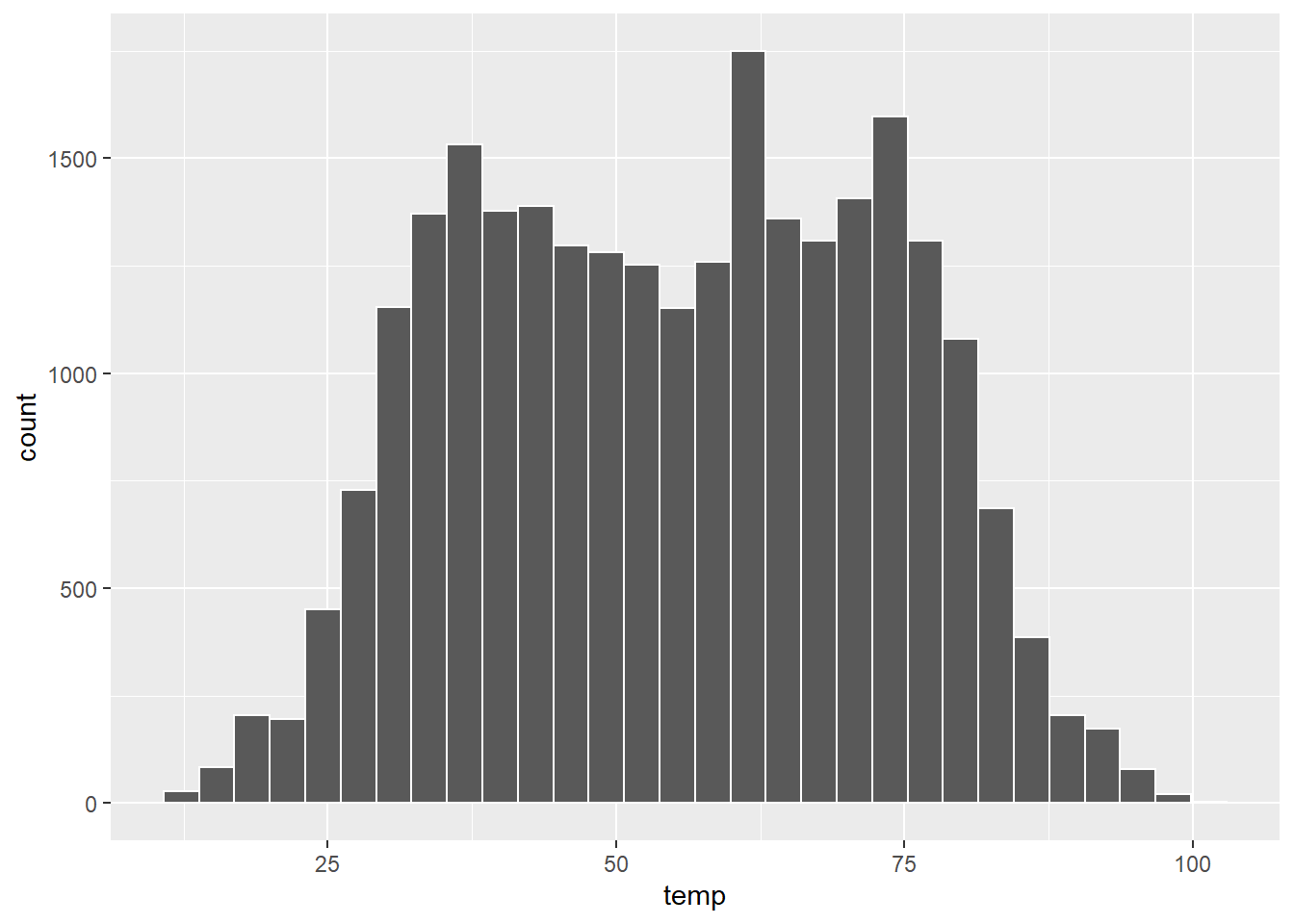
ggplot(weather, aes(x = temp)) + geom_histogram(color='white')
1
2

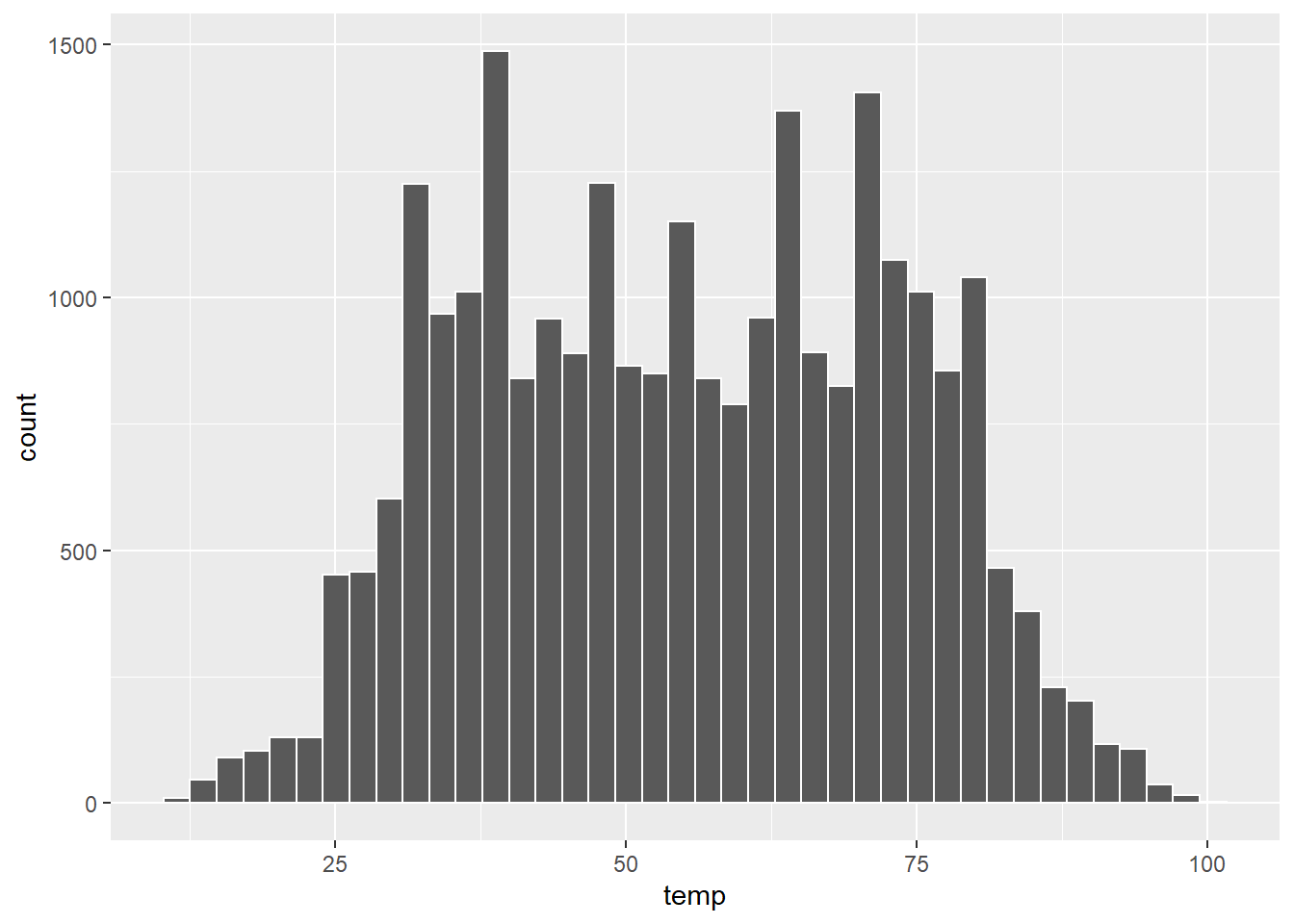
ggplot(weather, aes(x = temp)) + geom_histogram(color='white', bins=40)
1
2

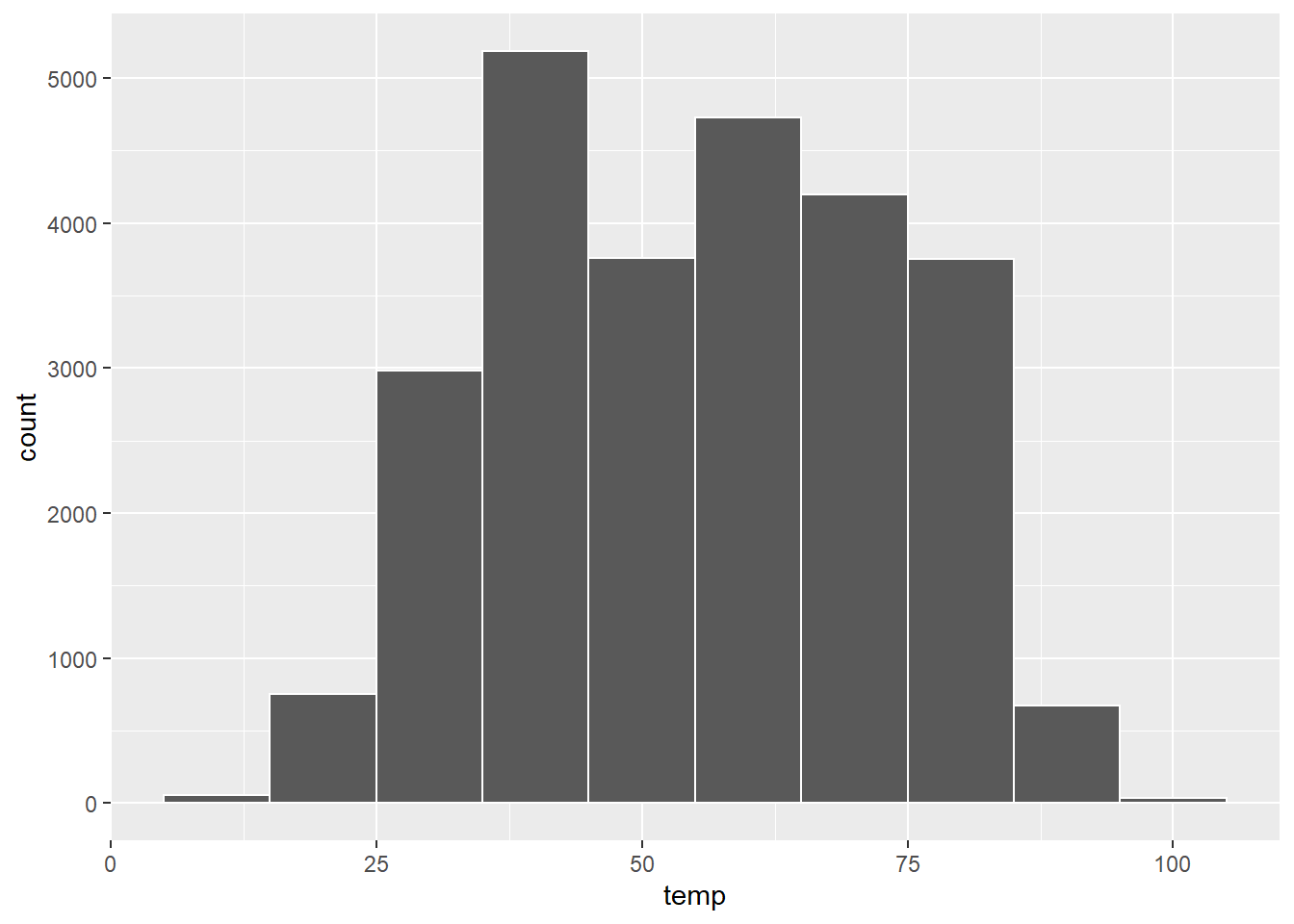
ggplot(weather, aes(x = temp)) + geom_histogram(color='white', binwidth =10)
1
2
3

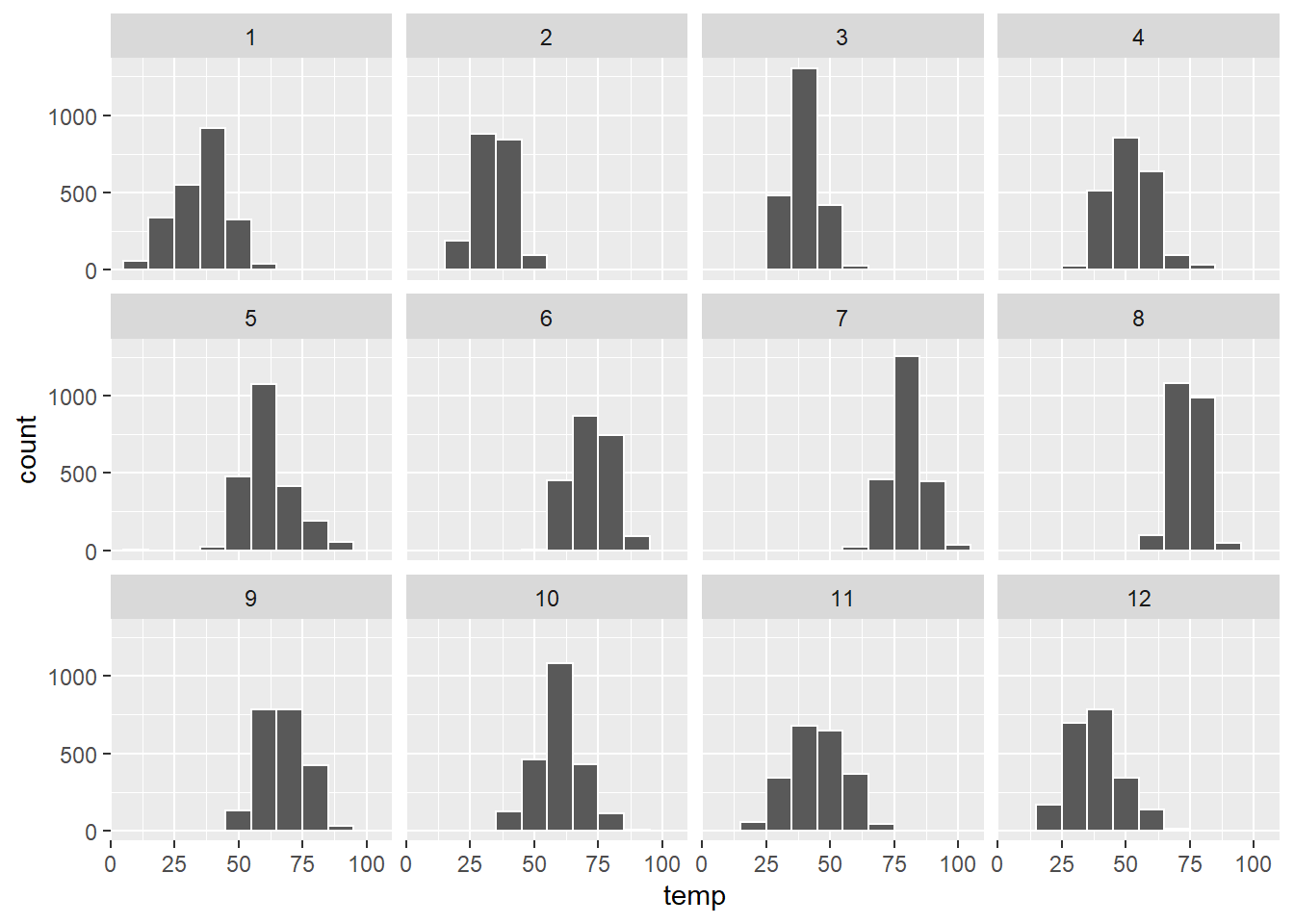
ggplot(weather, aes(x = temp)) + geom_histogram(color='white', binwidth =10) +
    facet_wrap(~month)
1
2

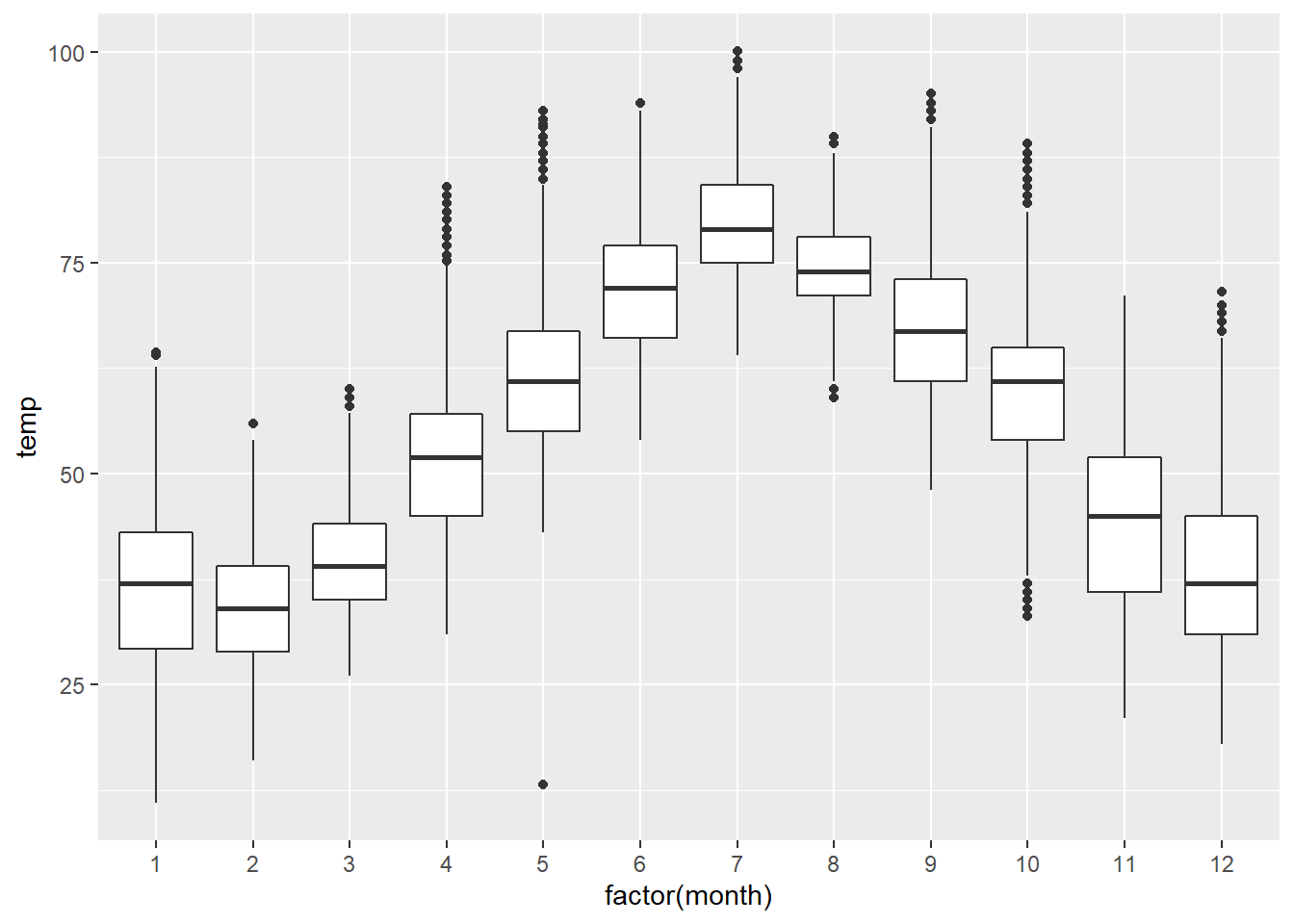
ggplot(weather, aes(x = factor(month), y = temp)) + geom_boxplot()
1
2

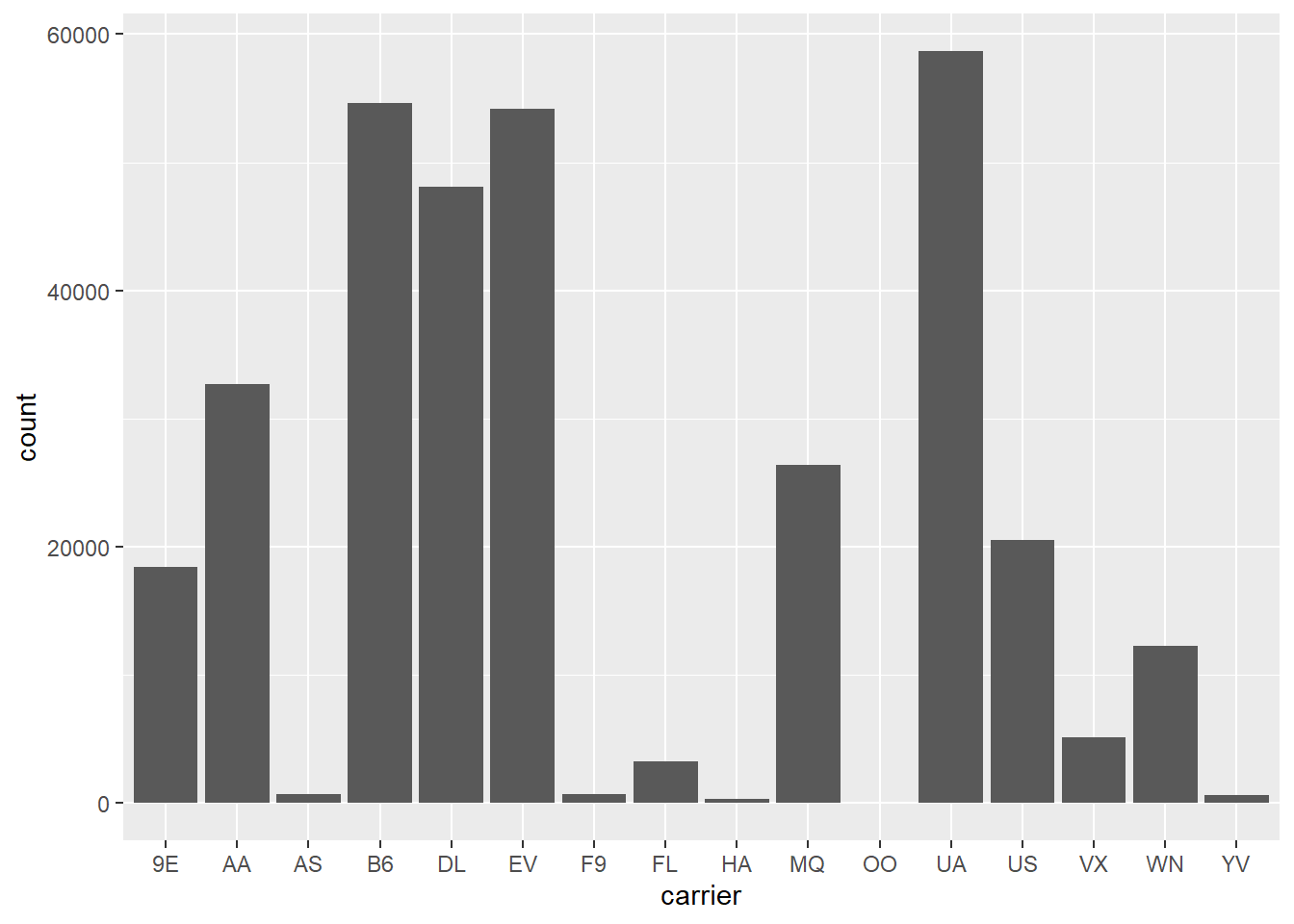
ggplot(flights, aes(x=carrier)) + geom_bar()
1
2
3

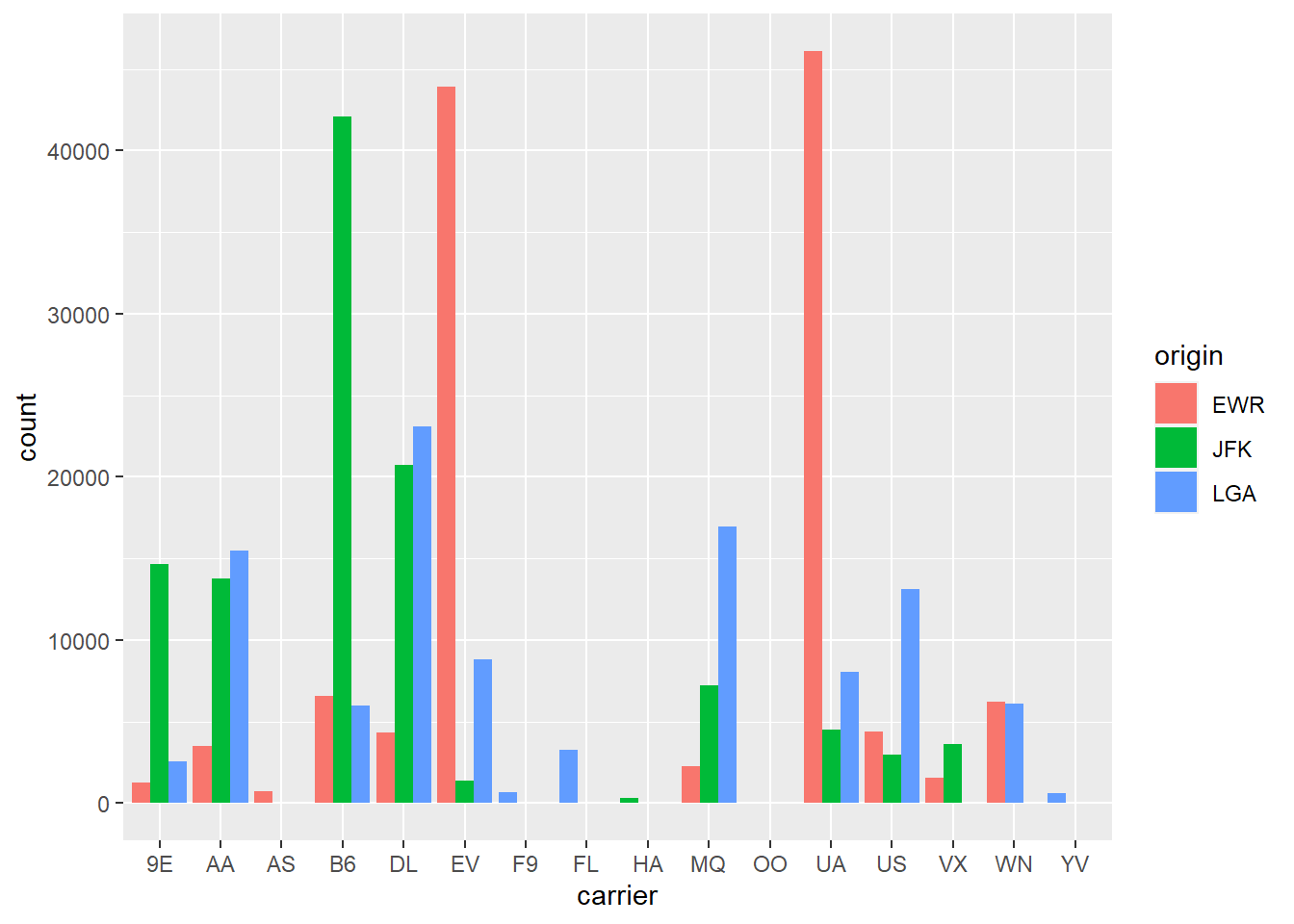
ggplot(flights, aes(x=carrier, fill = origin)) +
    geom_bar(position=position_dodge(preserve='single'))

Data Wrangling

The following are some of the main points covered in this chapter:

  • six functions in the dplyr package
    • filter
    • summarize
    • group_by
    • mutate
    • arrange
    • join
  • If you want to group_by two or more variables, you should include all the variables at the same time in the same group_by adding a comma between the variable names

Sample R Code

 1
 2
 3
 4
 5
 6
 7
 8
 9
10
11
12
13
14
15
16
17
18
19
20
21
22
23
24
25
26
27
28
29
30
31
32
33
34
35
36
37
38
39
40
41
42
43
44
45
46
47
48
49
50
51
52
53
54
55
56
57
58
59
60
61
62
63
64
65
66
67
68
69
70
71
72
73
74
75
76
77
78
flights %>%
    filter(dest=='PDX') %>%
    dim()
## [1] 1354   19
weather %>%
    summarise(mu = mean(wind_speed, na.rm=TRUE))
## # A tibble: 1 x 1
##      mu
##   <dbl>
## 1  10.5
weather %>%
    group_by(month) %>%
    summarise(mu = mean(wind_speed, na.rm=TRUE))
## # A tibble: 12 x 2
##    month    mu
##  * <int> <dbl>
##  1     1 11.2 
##  2     2 12.7 
##  3     3 12.9 
##  4     4 11.1 
##  5     5  9.52
##  6     6 10.3 
##  7     7  9.58
##  8     8  8.61
##  9     9  8.91
## 10    10  9.70
## 11    11 11.8 
## 12    12 10.1
weather %>%
    mutate(ws2 = wind_speed - mean(wind_speed)) %>%
    head(1)
## # A tibble: 1 x 16
##   origin  year month   day  hour  temp  dewp humid wind_dir wind_speed wind_gust
##   <chr>  <int> <int> <int> <int> <dbl> <dbl> <dbl>    <dbl>      <dbl>     <dbl>
## 1 EWR     2013     1     1     1  39.0  26.1  59.4      270       10.4        NA
## # ... with 5 more variables: precip <dbl>, pressure <dbl>, visib <dbl>,
## #   time_hour <dttm>, ws2 <dbl>
flights %>%
    group_by(dest) %>%
    summarise(num_flights = n()) %>%
    arrange(desc(num_flights)) %>%
    head(1)
## # A tibble: 1 x 2
##   dest  num_flights
##   <chr>       <int>
## 1 ORD         17283
flights %>%
    inner_join(airlines, by ='carrier') %>%
    head(2)
## # A tibble: 2 x 20
##    year month   day dep_time sched_dep_time dep_delay arr_time sched_arr_time
##   <int> <int> <int>    <int>          <int>     <dbl>    <int>          <int>
## 1  2013     1     1      517            515         2      830            819
## 2  2013     1     1      533            529         4      850            830
## # ... with 12 more variables: arr_delay <dbl>, carrier <chr>, flight <int>,
## #   tailnum <chr>, origin <chr>, dest <chr>, air_time <dbl>, distance <dbl>,
## #   hour <dbl>, minute <dbl>, time_hour <dttm>, name <chr>
flights %>%
    select(year, everything()) %>%
    head(1)
## # A tibble: 1 x 19
##    year month   day dep_time sched_dep_time dep_delay arr_time sched_arr_time
##   <int> <int> <int>    <int>          <int>     <dbl>    <int>          <int>
## 1  2013     1     1      517            515         2      830            819
## # ... with 11 more variables: arr_delay <dbl>, carrier <chr>, flight <int>,
## #   tailnum <chr>, origin <chr>, dest <chr>, air_time <dbl>, distance <dbl>,
## #   hour <dbl>, minute <dbl>, time_hour <dttm>
flights %>%
    top_n(n =10, arr_time) %>%
    head(2)
## # A tibble: 2 x 19
##    year month   day dep_time sched_dep_time dep_delay arr_time sched_arr_time
##   <int> <int> <int>    <int>          <int>     <dbl>    <int>          <int>
## 1  2013     1     1     2209           2155        14     2400           2337
## 2  2013     1     5     2116           2130       -14     2400             18
## # ... with 11 more variables: arr_delay <dbl>, carrier <chr>, flight <int>,
## #   tailnum <chr>, origin <chr>, dest <chr>, air_time <dbl>, distance <dbl>,
## #   hour <dbl>, minute <dbl>, time_hour <dttm>

Data Importing and Tidy Data

The following are some of the main points covered in this chapter:

  • In the context of doing data science in R, long/narrow format is also known as “tidy” format.
  • tidy data set
    • each variables forms a column
    • each observation forms a row
    • each type of observational unit forms a table
  • if you load tidyverse , it automatically loads the following packages
    • ggplot2
    • dplyr
    • readr
    • tidyr
    • purrr
    • tibble
    • stringr
    • forcats

Sample R Code

 1
 2
 3
 4
 5
 6
 7
 8
 9
10
11
12
13
14
15
16
17
18
19
20
21
22
23
24
25
dem_score  <- read_csv("https://moderndive.com/data/dem_score.csv")
dem_score %>%head(10)
## # A tibble: 10 x 10
##    country    `1952` `1957` `1962` `1967` `1972` `1977` `1982` `1987` `1992`
##    <chr>       <dbl>  <dbl>  <dbl>  <dbl>  <dbl>  <dbl>  <dbl>  <dbl>  <dbl>
##  1 Albania        -9     -9     -9     -9     -9     -9     -9     -9      5
##  2 Argentina      -9     -1     -1     -9     -9     -9     -8      8      7
##  3 Armenia        -9     -7     -7     -7     -7     -7     -7     -7      7
##  4 Australia      10     10     10     10     10     10     10     10     10
##  5 Austria        10     10     10     10     10     10     10     10     10
##  6 Azerbaijan     -9     -7     -7     -7     -7     -7     -7     -7      1
##  7 Belarus        -9     -7     -7     -7     -7     -7     -7     -7      7
##  8 Belgium        10     10     10     10     10     10     10     10     10
##  9 Bhutan        -10    -10    -10    -10    -10    -10    -10    -10    -10
## 10 Bolivia        -4     -3     -3     -4     -7     -7      8      9      9
drinks %>% 
    dplyr::filter(country %in% c("USA", "China", "Italy", "Saudi Arabia")) %>%
    select(-total_litres_of_pure_alcohol)%>%
    rename(beer = beer_servings,
           spirit = spirit_servings,
           wine = wine_servings) -> drinks_smaller

drinks_smaller %>%
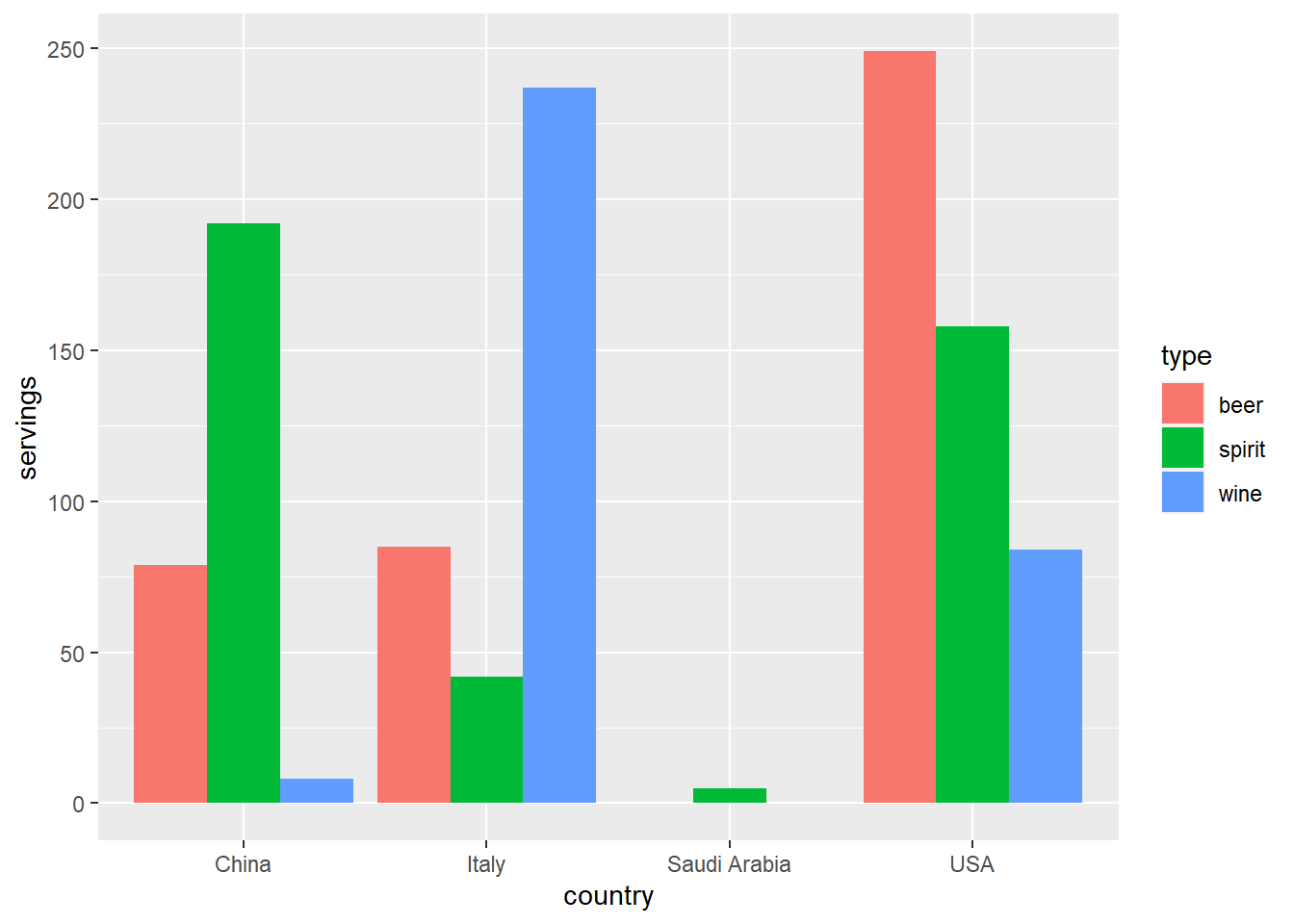
    pivot_longer(cols = -country, names_to="type", values_to = "servings")%>%
    ggplot(aes(x = country, y = servings, fill=type)) + geom_col(position="dodge")
 1
 2
 3
 4
 5
 6
 7
 8
 9
10
11
12
13
14

airline_safety %>%
    select(airline, starts_with("fatalities"))%>%
    pivot_longer(-airline)%>%mutate(x=strsplit(name,"_")[[1]][3])%>%head(1)
## # A tibble: 1 x 4
##   airline    name             value x    
##   <chr>      <chr>            <int> <chr>
## 1 Aer Lingus fatalities_85_99     0 99

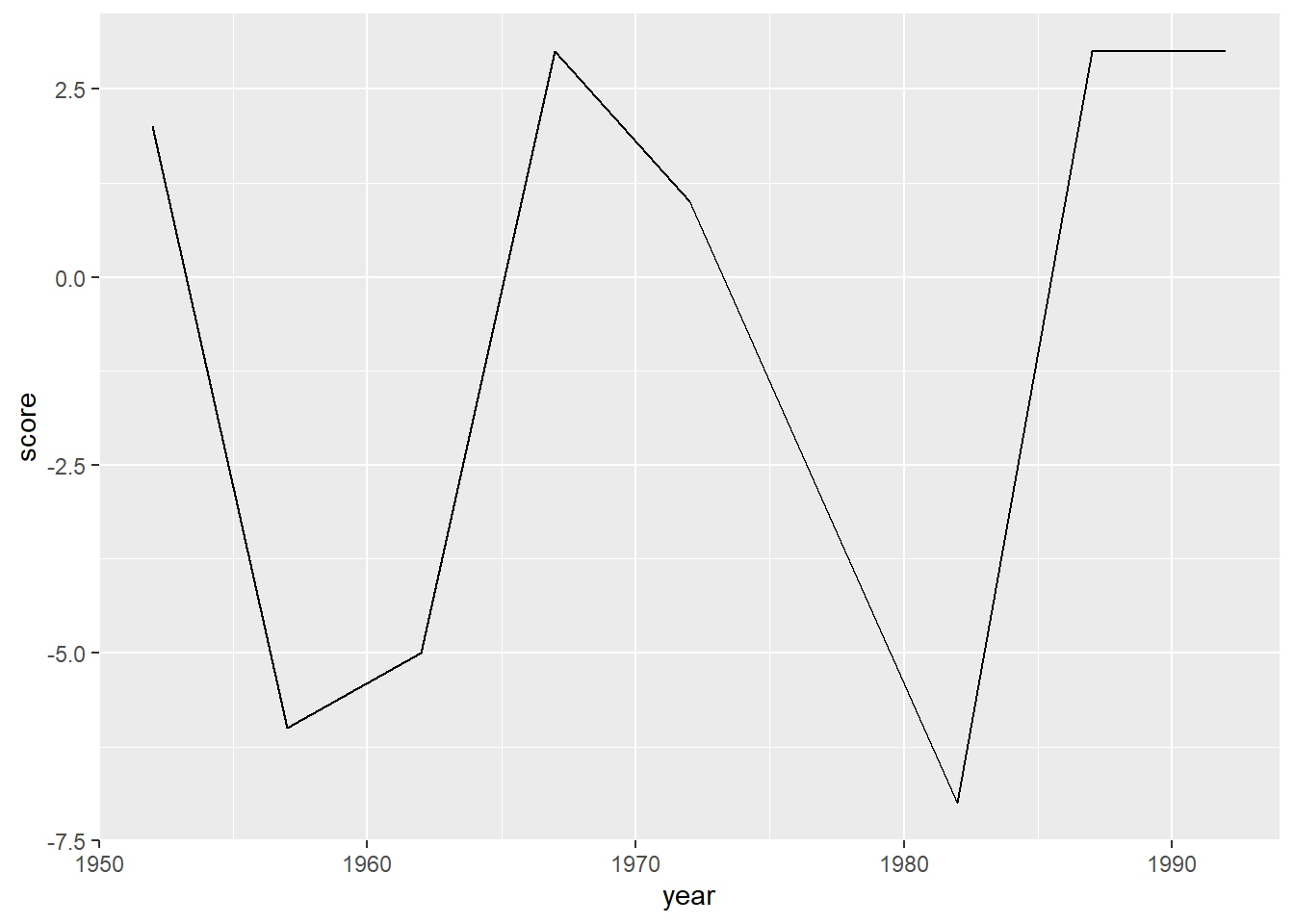
dem_score %>%
    dplyr::filter(country=="Guatemala")%>%
    pivot_longer(-country, names_to = "year", values_to="score",
                 names_transform = list(year = as.integer)) %>%
    ggplot(aes(x = year, y = score)) + geom_line()

Basic Regression

The following are some of the main points covered in this chapter:

  • why do we have two different labels, explanatory and predictor, for the variable x?
    • When you are modeling for explanation, you tend to use the term, explanatory variable
    • When you are modeling for preciction, you tend to use the term, predictor variable
  • intercept has no practical interpretation in a regression framework
  • example of a confounding variable: examination of medical records show that people who sleep with shoes on, wake up with a headache most of the time. This might be because we are missing a lurking variable - drinking alcohol. It is more likely that people who consume a lot of alcohol sleep with their shoes on, and hence are more likely to get a headache next morning. The amount of alcohol consumption is called confounding/lurking variable. It lurks behind the scenes, confounding the causal relationship of “sleepign with shoes on” with “waking up with a headache”
  • walks through various packages such as janitor and broom that can be used to tidy model output

Sample R code

1
2
3
4
5
evals %>%
    select(ID, score, bty_avg, age) -> evals_ch5

evals_ch5%>%select(score, bty_avg) %>%
    skim_without_charts()

Table: Table 1: Data summary

NamePiped data
Number of rows463
Number of columns2
_______________________
Column type frequency:
numeric2
________________________
Group variablesNone

Variable type: numeric

skim_variablen_missingcomplete_ratemeansdp0p25p50p75p100
score014.170.542.303.804.304.65.00
bty_avg014.421.531.673.174.335.58.17
1
2
3
4
5
6
7
8
9

evals_ch5 %>%
    get_correlation(score~bty_avg)
## # A tibble: 1 x 1
##     cor
##   <dbl>
## 1 0.187

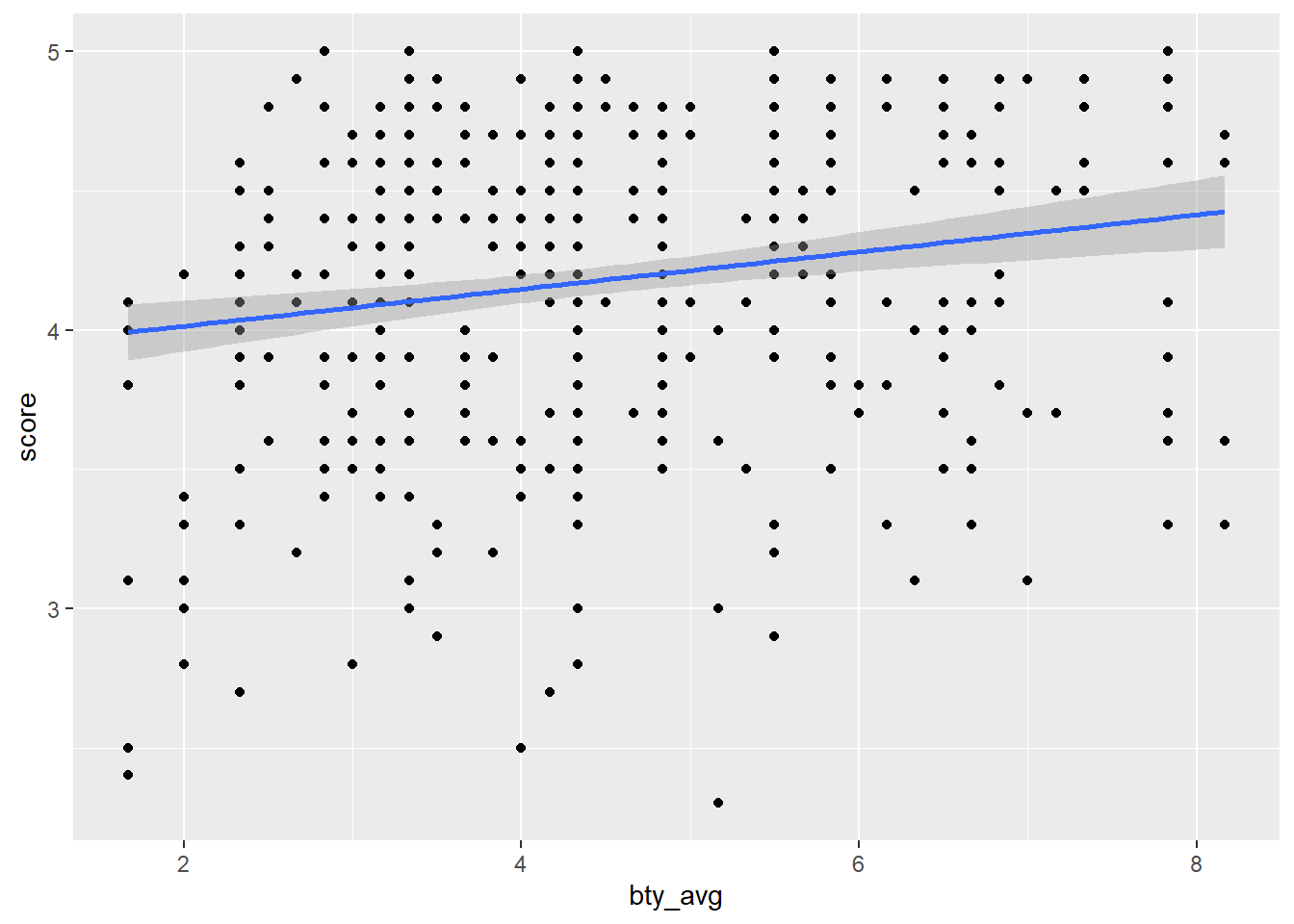
evals_ch5%>%ggplot(aes(x = bty_avg, y = score)) + geom_point() + geom_smooth(method ='lm')
1
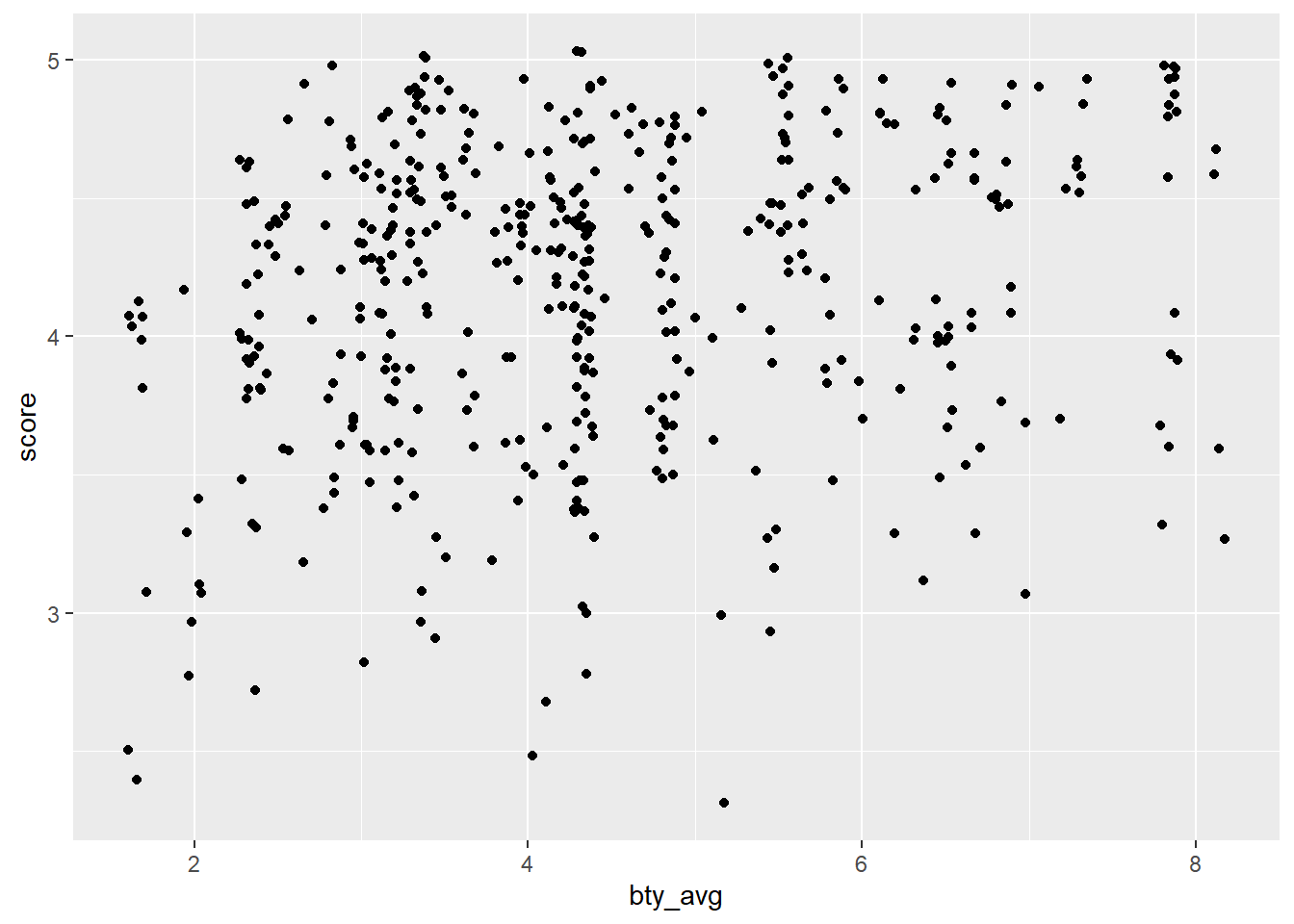
evals_ch5%>%ggplot(aes(x = bty_avg, y = score)) + geom_jitter()
 1
 2
 3
 4
 5
 6
 7
 8
 9
10
11
12
13
14
15
16
score_model <- lm(score~ bty_avg, data = evals_ch5)
get_regression_table(score_model)
## # A tibble: 2 x 7
##   term      estimate std_error statistic p_value lower_ci upper_ci
##   <chr>        <dbl>     <dbl>     <dbl>   <dbl>    <dbl>    <dbl>
## 1 intercept    3.88      0.076     51.0        0    3.73     4.03 
## 2 bty_avg      0.067     0.016      4.09       0    0.035    0.099
reg_points <- get_regression_points(score_model)

gapminder2007 <- gapminder %>%
    filter(year==2007) %>%
    select(country, lifeExp, continent, gdpPercap)

gapminder2007 %>%
    select(lifeExp, continent) %>%
    skim_without_charts()

Table: Table 1: Data summary

NamePiped data
Number of rows142
Number of columns2
_______________________
Column type frequency:
factor1
numeric1
________________________
Group variablesNone

Variable type: factor

skim_variablen_missingcomplete_rateorderedn_uniquetop_counts
continent01FALSE5Afr: 52, Asi: 33, Eur: 30, Ame: 25

Variable type: numeric

skim_variablen_missingcomplete_ratemeansdp0p25p50p75p100
lifeExp0167.0112.0739.6157.1671.9476.4182.6
1
2
3

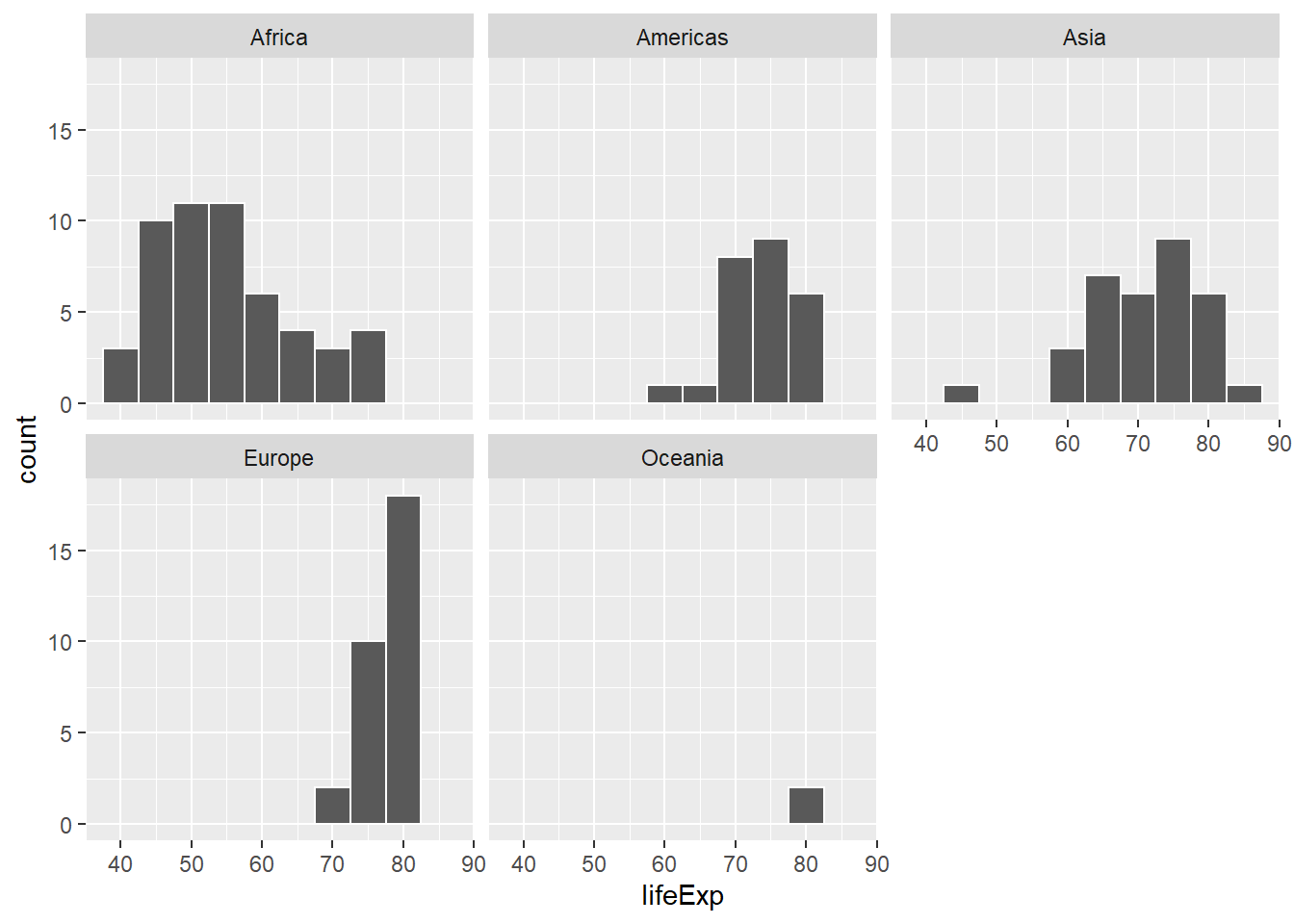
ggplot(gapminder2007, aes(x = lifeExp)) + geom_histogram(binwidth=5, color="white") +
    facet_wrap(~continent, nrow=2)
1
2

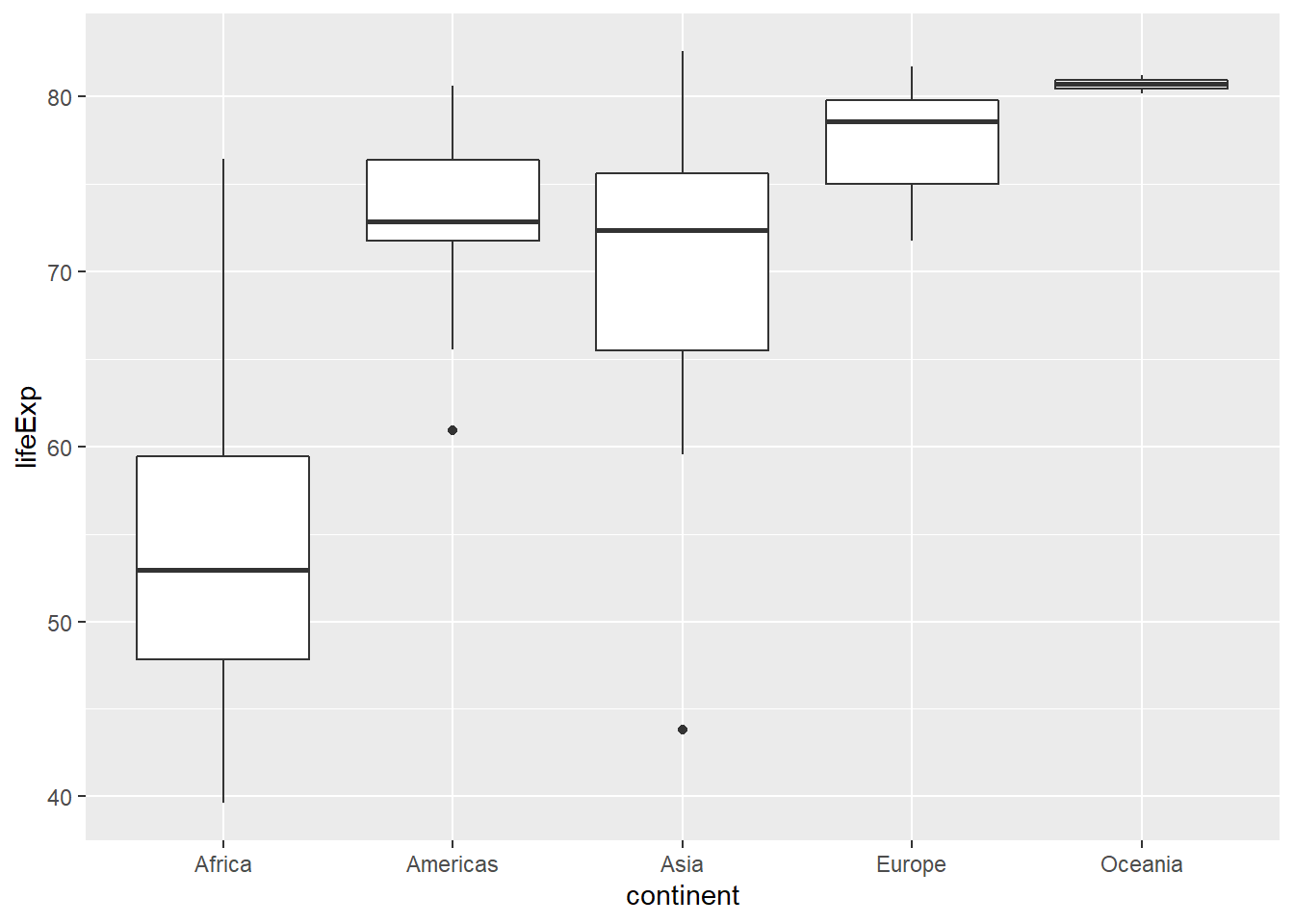
ggplot(gapminder2007, aes(x=continent, y = lifeExp)) + geom_boxplot()
 1
 2
 3
 4
 5
 6
 7
 8
 9
10
11
12
13
14
15
16
17
18
19
20
21
22
23
24
25
26
27
28
29
30
31
32
33
34
35
36
37
38
39
40
41
42
43
44
45
46
47
48
49
50
51
52
53
54
55
56

gapminder2007 %>%
    group_by(continent) %>%
    summarise(med = median(lifeExp), mu = mean(lifeExp)) %>%
    mutate(diff_af = mu - min(mu))
## # A tibble: 5 x 4
##   continent   med    mu diff_af
## * <fct>     <dbl> <dbl>   <dbl>
## 1 Africa     52.9  54.8     0  
## 2 Americas   72.9  73.6    18.8
## 3 Asia       72.4  70.7    15.9
## 4 Europe     78.6  77.6    22.8
## 5 Oceania    80.7  80.7    25.9

lifeExp_model <- lm(lifeExp~ continent, data = gapminder2007)

get_regression_table(lifeExp_model)
## # A tibble: 5 x 7
##   term              estimate std_error statistic p_value lower_ci upper_ci
##   <chr>                <dbl>     <dbl>     <dbl>   <dbl>    <dbl>    <dbl>
## 1 intercept             54.8      1.02     53.4        0     52.8     56.8
## 2 continentAmericas     18.8      1.8      10.4        0     15.2     22.4
## 3 continentAsia         15.9      1.65      9.68       0     12.7     19.2
## 4 continentEurope       22.8      1.70     13.5        0     19.5     26.2
## 5 continentOceania      25.9      5.33      4.86       0     15.4     36.4

score_model %>%
    augment() %>%
    mutate_if(is.numeric, round, digits=3) %>%
    clean_names() %>%
    select(-c("std_resid", "hat", "sigma" , "cooksd", "std_resid"))
## # A tibble: 463 x 4
##    score bty_avg fitted  resid
##    <dbl>   <dbl>  <dbl>  <dbl>
##  1   4.7    5      4.21  0.486
##  2   4.1    5      4.21 -0.114
##  3   3.9    5      4.21 -0.314
##  4   4.8    5      4.21  0.586
##  5   4.6    3      4.08  0.52 
##  6   4.3    3      4.08  0.22 
##  7   2.8    3      4.08 -1.28 
##  8   4.1    3.33   4.10 -0.002
##  9   3.4    3.33   4.10 -0.702
## 10   4.5    3.17   4.09  0.409
## # ... with 453 more rows

score_model %>%
    tidy(conf.int = TRUE) %>%
    mutate_if(is.numeric, round, digits=3) %>%
    clean_names() %>%
    rename(lower_ci = conf_low, upper_ci = conf_high)
## # A tibble: 2 x 7
##   term        estimate std_error statistic p_value lower_ci upper_ci
##   <chr>          <dbl>     <dbl>     <dbl>   <dbl>    <dbl>    <dbl>
## 1 (Intercept)    3.88      0.076     51.0        0    3.73     4.03 
## 2 bty_avg        0.067     0.016      4.09       0    0.035    0.099